Wednesday, 21 April 2010

Higher Education Academy Evidence Based Practice Employability and Employee Learning Seminar Series

'Not reinventing the wheel but using the wheels to make a better vehicle: the use of Web 2.0 to enhance and support Foundation Degree students undertaking work-based learning.'

Hosted here at the University of Plymouth on Wednesday 19 May 2010 (11am to 3pm). Its FREE and lunch is included.

The seminar '...will examine new and emerging Web 2.0 technologies which have the potential to enhance and transform the learner experience and to develop the 21st century employability skills of communication, participation, networking and sharing.'

Is it suitable for me?
The seminar is aimed towards academic and professional staff in HE and HE in FE who would like to use easily employed Web 2.0 technologies to support learners in work-based learning.

Where do I sign up?
More details and registration and further details on the presenters on our TechnologyEnhancedLearning website.

Thursday, 15 April 2010

Quicktime VRs (QTVR) now works on Windows 7 64bit

Just an update on my post back in Novemeber 2009 about QTVRs not working in Windows 7 64 bit. It took a long while for Apple to fix this bug, but it looks like the latest update to quicktime 7.6.6 now has QTVRs working on Window 7 64 bit. I must admit though, after this incident its probably best to stick with Flash based VRs in the future...

Friday, 9 April 2010

Plymouth eLearning Conference... 'To V or not to V? that is the question'

Another successful elearning conference here at Plymouth University! The venue was the famous Roland Levinsky building, providing the delegates with large lecture theatres and even a cinema! Each area had a dedicated PC with large screen showing the twitter feeds for #pelc10 coming through ...so far some very positive feedback on twitter. Thanks to Dominic Martignetti (Technical Director) for his efforts in organising this element of the conference (amongst all the other techy components of course! I know he work hard on this). On the point of thanks, we must not forget Mark Lyndon's efforts, creating another excellent conference website, with inclusion of his very creative imagery!

We had some very excellent key notes this year from Josie Fraser, Social and Educational Technologist and Dave White, University of Oxford. Professor Brian Chalkley, Director of Learning and Teaching, University of Plymouth, made some introductory remarks before Josie Fraser's presentation, emphasising the importance of Technology Enhanced Learning (TEL) at Plymouth and its impact on teaching and learning.

Josie presented digital literacy, identity & citizenship. Amusingly but quite poignantly in one part of her talk using the term: 'un-googleable man' a person that has essentially no digital footprint. This had me thinking, could such people actually exist in this technological age? Even if you have not EVER entered anything online, that does not stop others from doing so...Maybe you got a small mention in an online news article? Or published a journal article? Why not google yourself and see what you come up with... Chances are if you are reading this, you probably have some digital identity...

Dave White's talk included elements from the TALL blog (The TALL group is part of the Department for Continuing Education at the University of Oxford). Dave also mentions his technological transition from the Co-Digital to the Post-Digital diagram, and further linking this to: 'The Hierarchy Of Digital Distractions' (select the plain diagram to see the full pyramid) that was originally posted on informationisbeautiful.net. Thought provoking stuff indeed.

Shameful plug: I teamed up with Sally Holden, Luke McGowan and Paul Russell from the Peninsula College of Medicine & Dentistry, UK (based here in Plymouth University) to produce a talk entitled 'To V or not to V? that is the question' that included examples of our virtual development projects from both dentistry and the environmental sciences, to turn the session into a mini debate. Turning Point voting was also included to quiz the attendees.

More information on the conference is also provided on Steve Wheeler's blog (Conference Chair), also Mark Pannell , Mark Lyndon and Flea Palmer.

Some photos on flickr courtesy of Dawn Wheeler.

Thank you to all those involved both on the home and international organising committees. Looking forward to next years conference!

Wednesday, 7 April 2010

Sharepoint 2010 and Communicator 2007 are coming to Plymouth

I attended the SharePoint 2010 briefing where Mandy Goss outlined plans about the implimentation of SharePoint 2010 across the University.

What's happening with SharePoint?... These are the key points to remember:

  • tulip 2010/11 sites will be created using SharePoint 2010 these should be available for around the end of May 2010.

  • The new sites will be built without content using a new template

  • existing tulip 2009/10 sites will be retained until Christmas and then removed

  • The 3 year archive of tulip sites will no longer be available.

  • Student Portal front page and Mysites (including all staff MySites) will migrate to SP2010 around July 2010

What else?

  • Development is underway to create single-sign-on software (SSO), which means that from mid-May 2010, there will be SSO for all portal areas including Outlook Web Access no more typing in your passwords in different areas...

  • Office Communicator 2007 will roll out at the end of June, the Learning Technologists have been testing this software and there are some useful additional features.

  • Microsoft Office 2010 is still being evaluated so no plans for implementation just yet.

More information please!

Further details on Sharepoint and Office 2010 can be found on the Web Team Community. The actual PowerPoint that Mandy showed us can be found on the Web Team Community (Basic overview of Summer 2010 changes and developments) - username and password required to access these slides.

Are there any benefits to the new SharePoint?

  • In-page editing with WYSIWYG interface with an editing ribbon similar to the format in the existing Office products.

  • Fully customisable menu.

  • Social computing: tags, bookmarks, noticeboard (Similar to Facebook wall).

  • More themes and layouts (and easier to change layouts).

  • MS Office web apps (Similar to Google Docs)

  • Improved blogs and wikis

  • Collaborative MS Office documents (Similar to Google Docs)

  • Ability to work offline

Please also see the word document: What's new in Microsoft Sharepoint Server 2010

Tuesday, 30 March 2010

Ecosystems fieldcourse website goes live!

Very pleased to announce the completion of one of my projects, for the 1st year BIOL1101 Ecosystems Fieldcourse, working with Dr David Bilton. This website provides students information regarding fieldwork locations, group project and encourages them in 'asking questions in field biology'. This project overlaps with my role with the Experiential Learning CETL. Although the site is complete, future additions will include an interactive student poster development section, using examples of student posters from this years group projects.

Monday, 29 March 2010

Devon Great Consuls...Entering a new ERA (Enabling Remote Activity)


View Devon Great Consuls in a larger map


I visited Devon Great Consuls (near Tavistock, Devon) today with Dr John Maskall (University of Plymouth), Dr Trevor Collins (Open University/Knowledge Media Institute, JISC Portable VoWLAN project) and John Lea (JISC Portable VoWLAN project Consultant). This project is linked to the ERA (Enabling Remote Activity) project. More details about the Consuls can be found on the virtual tour.


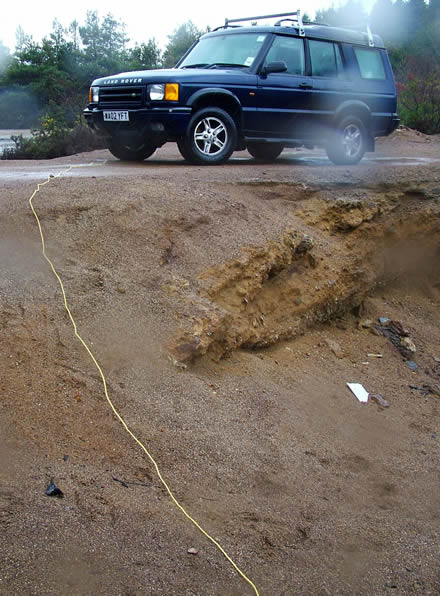
We were essentially testing Trevor's highly portable wireless communications network for use in the up and coming GEES conference in July (Geography, Earth and Environmental Sciences - Subject centre). Dr John Maskall teaches Environmental Science at this location and wanted to utilise some technology to aid learning and enhance accessibility. In the photos above (left to right): Plymouth University SoGEES's Land Rover - note network cable which was trailing to the antenna, Trevor (yellow safety jacket) and John Maskall who is wearing the communication headset. John Lea, was briefly enjoying the dry of the Land Rover, but not for long... Yes it was raining, but this did not spoil the experience! And before you ask, yes I had a go too and we all got soaked - in full weather gear or course ;)

Trevor and John Lea's set up consists of a home WiFi, network switch, batteries galore! loads of network cables, antenna, digital camera, video camera and number of portable Asus Eee PCs...

One of these PCs is used as a server, and the other two as clients. Both clients are used to communicate between the based server (in this case, one in the Land Rover). The 'roaming client PC' (Photo left: rucksack on John Maskall's back) communicates voice, and in addition digital photographs and video to the other user in the Land Rover. For the techys reading this, there are more details on the equipment and software used on the ERA wiki!

What struck John M and I immediately was how smooth the video and clear the voice communication was. (Photo right: video showing an Asus Eee PC - network cables dangling) The only real issues on this day were the occasional WiFi blind spot and keeping the lens free from rain! But this is exactly why its important to field test technology so we could iron out the bugs and improve for future deployment.


The antenna is shown on the far left (Photo left) with an additional fixed WiFi IP camera on the right (Photo left) which was displaying the whole of the consuls continuously. The blue bag actually contains the battery. Note that the yellow cable is the one trailing to the Land Rover which of course connects to the server within.

This antenna is the main communication link with the roaming unit (in this case John Maskall) No pun intended John... Considering that the main equipment is predominantly home WiFi equipment, it was extremely effective.
John Maskall was able to talk about the site while showing video, and I was able to also ask John to look at or describe specific items on the site as he roamed. I think you can start to see the benefits of such a setup.

I should explain that the Google 'My Map' above shows the areas in which we tested the unit (red lines) and the points are merely points of interest. Point 15 (blue flag) is where the antenna was located. The little blue truck is where the Land Rover was placed. You will need to zoom ('+') on the map near the very top points to view the icons clearly.

All in all an excellent day in the field, many thanks to Trevor and John Lea for making this a successful day and letting John Maskall and I really test the equipment to its full!

Trevor has posted more photos and a video on his blog.

Thursday, 18 March 2010

The TEL Teams first newsletter!

The first TEL newsletter has arrived! :D Most of you in UoP should have received this, but if you didn't please contact the team on TEL@plymouth.ac.uk.

Notable additions include:
*Central TEL Team drop in facility (Room 105, 3 Endsleigh Place), Please contact for bookings.
*How to compress images in PowerPoint!
*What's a podcast?
*Xerte - a new system to create your own TEL the easy way!
*Student in class voting system - TurningPoint.

Working with Joan Gavin (Learning Technologist) I knocked together this video showing the Student Voting system in action (Link also available on TEL newsletter!):


Thanks also to Sid White (Learning Technologist) for equipment loans! Plus Dr Shirley Atkinson and students featured in this demo.

    Wednesday, 3 March 2010

    Bing ...Augmented reality maps


    Came across this interesting video....'Blaise Aguera y Arcas demos new augmented-reality mapping technology from Microsoft.' Flickr photos are layered onto the 3D street views provided by Bing, with some very spectacular results. Could have some useful applications in education.

    Microsoft Bing maps and you will need the Silverlight plugin for it to work.

    I discovered that it currently only works in certain locations that allow street level navigation. Once the Silverlight is installed, try the working examples of this augmentation on Bing maps for San Fransisco etc first.

    Augmented reality - according to wikipedia...

    Thursday, 25 February 2010

    The Early Bird Catches the Worm - Plymouth e-Learning Conference 2010

    There is still time to register for the cheaper early bird rate for the Plymouth elearning conference 2010 (PeLC10) hosted here at Plymouth University for the 8th and 9th April 2010.

    The early bird rate is only available until the 5th March 2010. So book now as places are going fast, don't miss your chance by leaving it to the last minute.

    There will also be opportunity to experience the delights of the Experiential Learning CETLs Immersive Vision Theatre. Immerse yourself in light and sound.

    Also see Steve Wheeler's blog for further insights into this event.

    See you there!

    Wednesday, 17 February 2010

    Arena360 Experimental Week 'The igloo'

    Many of you may have noticed the 'igloo' outside of the Rolle Building this week. I had a sneak peek with the EL CETL Immersive Vision team. The Igloo has appeared as part of the Immersive Digital Arena Experimental Week. There is some very interesting content to view, so worth a visit. Perhaps you do a lot of fieldwork work with your students? ...It may conjure up some fieldwork ideas that could be used in the Immersive Vision Theatre.

    Information on the
    'Innovation for the Creative and Cultural Industries' (ICCI) and who's who is available on their site.