Showing posts with label technology enhanced learning. Show all posts

Monday, 22 September 2014

Library and IT essentials (for student Induction)

I've been working with my colleague Julie Moody who is an Information Specialist (Health, Education and Languages) to help create induction materials for students requiring guidance on Library and IT services at their disposal. This is a follow on project similar to the work for the 'Paper: Enhancing student induction to Library and IT services in Higher Education' which I'm happy to report is being used this year to good effect.
I've just finished a banner which will be used on-line to promote this resource during welcome week, shown to the left.

Wednesday, 30 July 2014

Workshop introductions


Working with my colleague Rob Stillwell (Senior Learning Technologist), we have produced a series of introductory videos for ASTI (Academic Support Technology and Innovation) workshops that have been developed by the team.  These are very short around ~1 minute just to give a taster of what can be expected. These now appear, embedded within the workshop pages, as an example please feel free to visit the More with Moodle workshop page.  This workshop provides advance pedagogic benefits of using Moodle. The video also appears on internal Moodle course pages related to those workshops.

These were filmed using DSLRs, external sound recorder and LED lighting.

Tuesday, 20 May 2014

Moodle Stories - How I went from sceptic to enthusiast


I've been working on the following video with my colleagues to capture views of others using Moodle as a teaching and learning platform. I've been eagerly waiting for the release of the official ASTI news letter before publishing this to my own blog. The ASTI newsletter articles, current and past are available here for those who are interested.

In the above video Gary Strong (Lecturer in Paramedic Practice) provides some very frank commentary on his experience of using Moodle and shares some of his pedagogical approaches.
Further detail on this video available via the ASTI website:
http://technologyenhancedlearning.net/moodle-stories/ which also provides some chapter jumping options.

This interview was created using two cameras (Canon), seperate (Zoom mic), and editing (by me) performed in Premiere Pro CS5.5.


Thursday, 15 May 2014

DigiThings video interview

Flea Palmer (Learning Technologist) recently interviewed Dr Emily Beaumont (Lecturer in Entrepreneurship) regarding the new DigiThings online course for academics. Here is the video I helped put together, capturing Dr Beaumont's experiences. It also gives insights into how this course also benefited her students.

This video with an evaluation can also be found on the ASTI website or visiting the DigiThings blog.

Saturday, 26 April 2014

Paper: Enhancing student induction to Library and IT services in Higher Education

Collaborative development,
dissemination and student interaction
I have had the pleasure of working on an exciting project with colleagues within ASTI (Academic Support Technology and Innovation), which resulted in a journal publication.

Part of this project was devising a means of making induction more exciting for the participants. One approach used to increase student involvement was to create a game within the induction presentation inside PowerPoint, so initial contact would be much more exciting for attendees. This was based on the BBC show 'Pointless', although in this case, very much angled to University services and support specific questions (Special thank you to the BBC for giving the University permission to adapt their game show idea in this project). Thanks also extends to the ASTI team collaborators involved in the development work for this project.  The digram to the left gives a visual description of how this works.

The co-written paper with my colleague Julie Moody (Information Specialist -Health, Education and Languages) is available from the journal of Innovative Practice in Higher Education, which also details this process and looks at feedback from the students:

MOODY, J. & TRUSCOTT, J. 2014. Enhancing student induction to library and IT services in higher education. Innovative Practice in Higher Education, 2.

UPDATE: similar processes are now being implemented in 5 external institutions.

Saturday, 22 March 2014

Teaching Fellowship: 'Getting Podcasting Right for Students and their Learning'

IMG_5527
Podcasting for learning
Very pleased to have been awarded a University Teaching Fellowship (Plymouth University), with colleagues from the Faculty of Science and Environment: Dr Martin Lavelle; Dr Carrie Headlam; Dr Paul Hewson and Prof David McMullan. Congratulations to you all! I look forward to working with you more closely in this very exciting fellowship.

The work will involve research and development in the use of podcasting for students in the School of Computing and Mathematics, looking specifically at what really works well for our students. We also welcome our critical friend Dr Karen Gresty (Associate Dean for the Faculty).  Implementing use of the new DLE (Digital Learning Environment) at Plymouth with Moodle as the central modular learning platform.

Sunday, 19 January 2014

Two new modules for the Hydrographic Academy

Sneaky snapshot of interface
I've been working hard on the design and development of another user interface for the Hydrographic Academic with Plymouth University.  This design has additional interactive usability enhancements, making it easier for students to find all the learning materials and support their needs. As in previous interfaces, I have incorporated HTML5 video integration and now includes some CSS3, JQuery and Javascript menu navigation to help thing look more interesting.  I've been asked not to give away too much as the Academy likes to surprise their students. This time round the Academy has produced 2 new modules based around this design, which incorporates a plethora of digital learning materials from both dedicated Academy and invited lecturers.  Details are available on the HA website.  I hope the students enjoy the next round of learning!

Monday, 13 January 2014

DigiThings


A multi-collaborative digital skills development programme started this week (created at Plymouth University). It is aimed at those involved in teaching wishing to learn about new and different digital tools first hand.  Further details can be found on the DigiThings blog, which is worth a look.

For this course I had the pleasure of compiling together ~30sec talking heads introduction videos from each of the team members involved, within their respective areas.  The above Prezi features all the videos. Many thanks to all and also to Flea Palmer, Edd Bolton and Ed Bremner for the video brainstorming and Prezi development.

Those interested in the video equipment - I used a Canon 650D and edited the content within Premiere Pro CS5.5 (also for titling).  Screen capture was performed by the respective team members (using applications such as Adobe Captivate, ScreenFlow and Camtasia).

Thursday, 12 December 2013

Introduction to DSLR: a workshop to train the Learning Technologist

I have been working hard putting together a selection of photographic/video equipment for the learning technologists to help demonstrate effective use of technologies to staff. The idea was to empower them to create their own videos for workshops and demonstrations of other learning technologies.  This has culminated in the creation of a workshop to train my colleagues in the art of the possible. Thought I would share the plan of a very fun session :)
______________________________________________________________

Timings and learning outcomes for DSLR show and train for LTs


10:00 Technical introduction to the equipment.


10:15 Demonstration of the following (This includes using the Zoom MP3 recorder):


  1. Face to camera interview.
  2. Interviewer and interviewee scenario.
  3. Still photograph (head and shoulders).

10:45 Breakout groups of ~6:

  1. One group remains in classroom.
  2. The other group goes elsewhere.

11:15 Breakout group return to classroom and discusses experiences with others.

11:30 Pack away equipment and ready for staff Christmas meal.

Learning outcomes


  • Understand how to handle both camera and MP3 recorder for basic operation.
  • Photograph a subject (person).
  • Use the camera for an interview.
  • Use the MP3 for an interview.

______________________________________________________________

Much thanks to Ed Bremner (Learning Technologist) who helped co-run and develop this session, with his excellent knowledge and experience of video and stills photography.

Friday, 8 November 2013

Become a Digital Guru (promotional poster)

Become a Digital Guru


A poster I created using InDesign 5.5 for ASTI. Aimed at Plymouth University staff, the poster is being used to promote/advertise a few of the new workshops available to train staff. All available workshops can be found here: http://technologyenhancedlearning.net/workshops/

Tuesday, 22 October 2013

Publication: Video for Teaching and Learning

Just completed, published and printed an ASTI (Academic Support, Technology and Innovation) guide I have been working on to help Plymouth University staff get started in the use of video for teaching and learning.  I've been using video since my early teens and was very pleased to be able to share some of this knowledge while writing this guide.

This 4 pager takes the reader through the stages of video production, pitfalls and includes tips on how to get the best out of their videos. The photos in this publication were taken by me and include an image of Prof Iain Stewart (Geology) with his students on field location, the laboratory photographs are of some equipment used by Dr Roy Lowry (Chemistry) in his own productions for a range of video podcasts that he uses for pre-laboratory work with his students. I was very pleased to have been a supporting member of staff for Roy as part of his Teaching Fellowship. Thank you to Flea Palmer for letting me also use a picture of her on the front cover!

This guide is also used to complement a hands on video workshop run by the learning technologist.

Tuesday, 14 August 2012

Recording environments and microphones

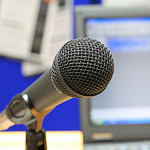
Microphone image
I get asked from time to time what microphones should I use for recording podcasts, instructional videos or simply capturing a voice during a PowerPoint presentation.  Sound is probably one of the trickier elements to get right.  If the quality of the sound is poor, then it can make listening uncomfortable or not very enjoyable for the listener.  Most mid range microphones can produce very good sound, where most of the problems originate is the environment, and how the microphone is connected to the recording equipment (in these examples - a PC).

A few considerations:
  1. Get a good microphone Don't be a cheapskate on this one... else you could spend hours of your time on re-recordings - Ill provide some more details on why later in this post.  
  2. Invest in an anti-pop filter - this gets rid of the 'puffing' sound, caused by wind movement when very close to the microphone.  A decent 6 inch one will only set you back around £12+ always check the reviews.
  3. Be consistent with your environment - different rooms will have different sound reflections - for example rooms that have more carpet are less likely to echo. Get into the habit of positioning the microphone at the same distance from your mouth. There is also a lot of noise coming from PC cooling fans, if you have a window open (next to a busy road) or noisy corridor, its often difficult to escape. Find a quiet place or even invest in a portable sound booth, build your own or if you have a big budget, go for a Vocal Booth (which is a self contained unit with audio damping).  Yes, I know they look silly, but it helps cut out the background noise behind the microphone.  It really boils down to how seriously you take your audio.
  4. Monitor, USB mouse and Keyboard extension cables - I don't hear this mentioned often, but if you want to keep the computer noise at bay, why not get some 3-4 metre extension cables for the PC - maybe a separate monitor if you are using a laptop.   This allows you to place the microphone far enough away from noisy computer fans. (Typical PC setups will require a Monitor extension cable - a USB cable for the keyboard and and USB cable for the mouse - check the monitor plugs for the types you need.) - N.B. extending the length of your microphone lead will introduce noise - ensure you choose high quality cabling. If it reaches with the standard length it's probably best to stick with that!

What is a decent microphone?

Pop filter - they're big but work well!
For most things (voice in particular) you are likely to end up spending at least £80+ on a decent condensing microphone.  Condensing microphones capture the natural timbre in peoples voices and capture the most naturally sounding audio.  However, as most of us record via our personal computers there are a few things to consider:

  1. On-board sound card using standard (3.5mm plug) microphones - you may find that your sound card is not up to the job.  It is probably capable of fairly good sound, but can lack detail if using cheap microphones (N.B. the pros use XLR connectivity for best sound which is lacking on all standard PCs!), depending on your operating system, you also may have a battle with software volume controls and microphone boosts to get it sounding reasonable.
  2. USB microphones  - these have their own built in sound cards - typically manufacturers have developed them to compensate for noise introduced via cables etc. Be careful, as not all of these are up to the quality you may expect.
  3. Lapel microphones, you are looking at a lot of money to get professional quality sound - its a trial an error game for the cheaper ones.
  4. Mixing benches (lots of knobs and dials) - these are good if you have multiple microphone set-ups allowing users to blend sounds (and provide pre amplification for professional microphones). However you have to ensure that you have a relatively noise free USB audio adaptor to introduce clean digitised audio into your PC,  or else all the benefits you get from the microphone are lost in noise introduce at the final stages. Top end sound cards with XLR plugs may work but they are expensive and can add extra levels of complexity.  Most people just want to plug in and record with out the trouble of multiple knobs and sliders to contend with. 
  5. Omnidirectional or Unidirectional (loosely speaking 'Cardioid') microphones?  Which ones?  Omnidirectional picks up sound from every direction, whereas Unidirectional only records from one direction (the front of the microphone, typically).  Omnidirectional tend to be more sensitive and you can expect ambient noise to be collected in huge quantities, whereas most unidirectional have the specific directional properties and are typically only usable between 4-10 inches from the mouth. Because of a lack of sensitivity behind the microphones (particularly Cardioid) they are less likely to pick up external noise directly behind them (N.B. using them the wrong way round makes them sound muffled). Unidirectional (Cardioid) are likely to be the best ones for use in office spaces with a decent sound booth.  Further details on the various types of microphones available on wikipedia - its vast - only if you're interested!
JISCDigital Media have a cracking article on USB microphones, with some setting up guides, worth a look. Here are the key facts:

·         The microphone connects to the computer USB port
·         Consistent sound across different systems
·         Plug and Play installation
·         Many USB mics have a headphone jack for monitoring
·         Many USB mics are optimised for voice

‘…In many cases settings are chosen with a particular use in mind, and many are optimised for voice recording. If your intended use is compatible with this preset factory set-up, a USB microphone can save you a lot of the time and knowledge needed for correct set-up, and will simplify the recording workflow. While there is a quality ‘ceiling' beyond which a USB microphone will not take you, it also presents very few opportunities to go wrong.’

The ceiling that JISC Digital Media refer to consists of a number of factors.  The biggest is that condensing microphones require their own pre-amplifier, the only way you get the power via a USB microphone is normally the USB port, you are then at the mercy of the quality of the power emanating from any given USB.  However, most companies worth their salt build in electronics to smooth out noisy power.  Its a case of try it and see - if you like what you hear, stick with it!

JISC Digital also include some audio examples in their article:


Hover over the various black markers to see which microphone they are testing (during audio playback it is possible to move the orange slider to those positions by dragging). Personally I was not impressed with the headset sound and some of the cheaper condensing microphones are a little hollow sounding (its all down to personal taste really).  The Blue Yeti, certainly provides some excellent sound in the JISC Digital Media review, although its design may lead to tricky clamping and positioning of a pop-filter (it's a minor quibble).

A few examples of good USB microphones (Always check the reviews before making the final decision!):
Remember that all the examples of audio recording provided for these microphones will only sound as good as the headset or speakers you are using to review them!

I'll quickly add that headphones such as the Sennheiser HD 202 Closed Back On-ear Stereo Headphone are relatively cheap (considering) but provide really excellent sound. If you dont like the look or design try looking through the reviews for other brands or more expensive versions.  I can recommend these as I have a pair. I was also pleased to see people like Steven Spielberg using them to review audio in a recent movie review - if its good enough for him... ;)

Happy microphone hunting...


Tuesday, 26 June 2012

Learning to use Premiere Pro CS5 - 5.5


Adobe provide a number of free learning resources that most users would find helpful and even get you started, if your're a beginner. The CS5 - 5.5 versions are available via Adobe TV They take you from understanding the interface right up to collaborative projects.

Granted they are also trying to sell a brand/product but if you look past the plug some of the hints and tips are very helpful. Adobe TV work along side lynda.com, who create a number of other training materials (at a cost) They do provide examples for their training materials, its worth a look as you may find one you you are looking for... happy learning :)

Monday, 18 June 2012

Hydrographic Academy at HE STEM Workforce Development & Employability in the South West Conference

IMG_0030_e

I attended a presentation for the Hydrographic Academy with HE STEM today. It was chaired by Prof Jim Griffiths (Head of the School of Geography, Earth & Environmental Sciences, University of Plymouth) and presented by Dr Richard Thain (soon to be Director, The Hydrographic Academy) His slides are available from the HE STEM site in PowerPoint format.

The rest of the team 'in attendance' were placed on a panel at the front for 20mins to an audience of some 80 persons to help answer any burning questions. It included: Tony Jenks, Luke Denner, Jon Scott and myself. We had a range of questions from student tutoring, support and choice of interface. I think we all did a very good job at answering everything successfully, after all, we know it inside out. We were warmly welcomed by Ruth Waring (HE STEM) thank you Ruth, and delighted at all the positive feedback from others. The Hydrographic Academy has indeed been a lot of hard work from a great team of people and it shows!  


IMG_0022Alison Austin (Placements Officer) and Carolyn Deeming (Schools Liaison Officer) set up the Plymouth University stand with all the Faculty of Science and Technology information and kindly looked after the Hydrographic Academy banner, thank you to them! They chose not to be in the picture... I did try!

The event was situated at Sandy Park grounds in Exeter, this is what it looked like outside the venue!  The team even had the opportunity to briefly sit in the padded executive chairs at the top shown in the right of the picture (below) during lunch, just a shame there was no game at the time ;-)


Sandy_Park_grounds


A big thank to all the other presenters and everyone involved in making this a very enjoyable event.  I think this was a superb and fitting finally to our work with HE STEM (South West) region and we were all very pleased to share our knowledge and experiences.  


P.S....not quite finished with HE STEM...the Academy will also be presenting in the final HE STEM conference in Birmingham later this year.


Wednesday, 18 April 2012

Pelecon 2012 Day 1

IMG_5301IMG_5242IMG_5243IMG_5245IMG_5246IMG_5248
IMG_5252IMG_5253IMG_5256IMG_5261IMG_5263IMG_5265
IMG_5267IMG_5268IMG_5269IMG_5270IMG_5272IMG_5278
IMG_5279IMG_5280IMG_5281IMG_5288IMG_5289IMG_5290
Pelecon 2012 Day 1, a set on Flickr.
A sneak peak of day 1 at Pelecon (Plymouth E-Learning Conference) at Plymouth University... enjoy :)
What to share your own? Feel free to join the Pelecon group on Flickr, we would love to see yours too!

All hands on deck: Developing technology enhanced distance learning for the marine industry
I also co-presented (and chaired) the first opening batch of sessions for the conference to a rough head count of 50 people.  My presentation was to do with the work I had been doing for the Hydrographic Academy.  I decided to angle it towards how we as Learning Technologists would approach such massive distance learning development project (More details are also available in 'My Projects' section about the technology choices made). The video includes the questions at the end.  This project is managed by Dr Richard Thain (Director, The Hydrographic Academy):

Monday, 26 March 2012

The official launch video for the Hydrographic Academy


I finally got time to edit the footage I took for the official launch of the Hydrographic Academy. The Academy was very pleased to share the stand with the Marine Institute during the conference, with the launch being held at our industrial partners stand (Fugro).  This video shows some highlights at the both stands and clips around the conference, plus the speeches from both Andrew McNeill (Global Learning & Development Manager. Fugro), Barbara Bond (Pro-Chancellor, Plymouth University) and Dr Richard Thain (Project Manager, Hydrographic Academy).  All attendees were treated to a Plymouth Gin and tonic, to mark the occasion. More details can be found on the Hydrographic Academy Blog post 'Making a splash...'  Hope you enjoy the video.

Those interested in the technical elements of the filming.  I used a Canon 600D, 18-55mm lens throughout. The audio gain was set to manual and a Zoom H1 attached to provide stereo sound. All editing was performed in Adobe Premiere Pro CS5.5

Oceanology International 2012

Plymouth Gin at the Hydrographic Academy launch!IMG_0984IMG_0985IMG_0986IMG_0987IMG_0997
IMG_1000IMG_1002IMG_1003IMG_1004IMG_1005IMG_1006
IMG_1007IMG_1010IMG_1011IMG_1015IMG_1017IMG_1018
IMG_1021IMG_1023IMG_1019IMG_1025IMG_1026IMG_1027

These photos were taken at the Oceanology International 2012. Which includes images of the vendor stands, the venue and also the Hydrographic Academy's official Launch.

www.oceanologyinternational.com/

Details on the Hydrographic Academy here:
www.plymouth.ac.uk/hydro