Wednesday, 7 April 2010

Sharepoint 2010 and Communicator 2007 are coming to Plymouth

I attended the SharePoint 2010 briefing where Mandy Goss outlined plans about the implimentation of SharePoint 2010 across the University.

What's happening with SharePoint?... These are the key points to remember:

  • tulip 2010/11 sites will be created using SharePoint 2010 these should be available for around the end of May 2010.

  • The new sites will be built without content using a new template

  • existing tulip 2009/10 sites will be retained until Christmas and then removed

  • The 3 year archive of tulip sites will no longer be available.

  • Student Portal front page and Mysites (including all staff MySites) will migrate to SP2010 around July 2010

What else?

  • Development is underway to create single-sign-on software (SSO), which means that from mid-May 2010, there will be SSO for all portal areas including Outlook Web Access no more typing in your passwords in different areas...

  • Office Communicator 2007 will roll out at the end of June, the Learning Technologists have been testing this software and there are some useful additional features.

  • Microsoft Office 2010 is still being evaluated so no plans for implementation just yet.

More information please!

Further details on Sharepoint and Office 2010 can be found on the Web Team Community. The actual PowerPoint that Mandy showed us can be found on the Web Team Community (Basic overview of Summer 2010 changes and developments) - username and password required to access these slides.

Are there any benefits to the new SharePoint?

  • In-page editing with WYSIWYG interface with an editing ribbon similar to the format in the existing Office products.

  • Fully customisable menu.

  • Social computing: tags, bookmarks, noticeboard (Similar to Facebook wall).

  • More themes and layouts (and easier to change layouts).

  • MS Office web apps (Similar to Google Docs)

  • Improved blogs and wikis

  • Collaborative MS Office documents (Similar to Google Docs)

  • Ability to work offline

Please also see the word document: What's new in Microsoft Sharepoint Server 2010

Tuesday, 30 March 2010

Ecosystems fieldcourse website goes live!

Very pleased to announce the completion of one of my projects, for the 1st year BIOL1101 Ecosystems Fieldcourse, working with Dr David Bilton. This website provides students information regarding fieldwork locations, group project and encourages them in 'asking questions in field biology'. This project overlaps with my role with the Experiential Learning CETL. Although the site is complete, future additions will include an interactive student poster development section, using examples of student posters from this years group projects.

Monday, 29 March 2010

Devon Great Consuls...Entering a new ERA (Enabling Remote Activity)


View Devon Great Consuls in a larger map


I visited Devon Great Consuls (near Tavistock, Devon) today with Dr John Maskall (University of Plymouth), Dr Trevor Collins (Open University/Knowledge Media Institute, JISC Portable VoWLAN project) and John Lea (JISC Portable VoWLAN project Consultant). This project is linked to the ERA (Enabling Remote Activity) project. More details about the Consuls can be found on the virtual tour.


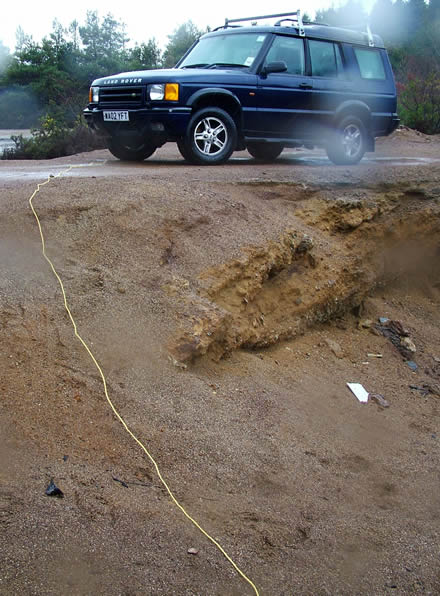
We were essentially testing Trevor's highly portable wireless communications network for use in the up and coming GEES conference in July (Geography, Earth and Environmental Sciences - Subject centre). Dr John Maskall teaches Environmental Science at this location and wanted to utilise some technology to aid learning and enhance accessibility. In the photos above (left to right): Plymouth University SoGEES's Land Rover - note network cable which was trailing to the antenna, Trevor (yellow safety jacket) and John Maskall who is wearing the communication headset. John Lea, was briefly enjoying the dry of the Land Rover, but not for long... Yes it was raining, but this did not spoil the experience! And before you ask, yes I had a go too and we all got soaked - in full weather gear or course ;)

Trevor and John Lea's set up consists of a home WiFi, network switch, batteries galore! loads of network cables, antenna, digital camera, video camera and number of portable Asus Eee PCs...

One of these PCs is used as a server, and the other two as clients. Both clients are used to communicate between the based server (in this case, one in the Land Rover). The 'roaming client PC' (Photo left: rucksack on John Maskall's back) communicates voice, and in addition digital photographs and video to the other user in the Land Rover. For the techys reading this, there are more details on the equipment and software used on the ERA wiki!

What struck John M and I immediately was how smooth the video and clear the voice communication was. (Photo right: video showing an Asus Eee PC - network cables dangling) The only real issues on this day were the occasional WiFi blind spot and keeping the lens free from rain! But this is exactly why its important to field test technology so we could iron out the bugs and improve for future deployment.


The antenna is shown on the far left (Photo left) with an additional fixed WiFi IP camera on the right (Photo left) which was displaying the whole of the consuls continuously. The blue bag actually contains the battery. Note that the yellow cable is the one trailing to the Land Rover which of course connects to the server within.

This antenna is the main communication link with the roaming unit (in this case John Maskall) No pun intended John... Considering that the main equipment is predominantly home WiFi equipment, it was extremely effective.
John Maskall was able to talk about the site while showing video, and I was able to also ask John to look at or describe specific items on the site as he roamed. I think you can start to see the benefits of such a setup.

I should explain that the Google 'My Map' above shows the areas in which we tested the unit (red lines) and the points are merely points of interest. Point 15 (blue flag) is where the antenna was located. The little blue truck is where the Land Rover was placed. You will need to zoom ('+') on the map near the very top points to view the icons clearly.

All in all an excellent day in the field, many thanks to Trevor and John Lea for making this a successful day and letting John Maskall and I really test the equipment to its full!

Trevor has posted more photos and a video on his blog.

Thursday, 18 March 2010

The TEL Teams first newsletter!

The first TEL newsletter has arrived! :D Most of you in UoP should have received this, but if you didn't please contact the team on TEL@plymouth.ac.uk.

Notable additions include:
*Central TEL Team drop in facility (Room 105, 3 Endsleigh Place), Please contact for bookings.
*How to compress images in PowerPoint!
*What's a podcast?
*Xerte - a new system to create your own TEL the easy way!
*Student in class voting system - TurningPoint.

Working with Joan Gavin (Learning Technologist) I knocked together this video showing the Student Voting system in action (Link also available on TEL newsletter!):


Thanks also to Sid White (Learning Technologist) for equipment loans! Plus Dr Shirley Atkinson and students featured in this demo.

    Wednesday, 3 March 2010

    Bing ...Augmented reality maps


    Came across this interesting video....'Blaise Aguera y Arcas demos new augmented-reality mapping technology from Microsoft.' Flickr photos are layered onto the 3D street views provided by Bing, with some very spectacular results. Could have some useful applications in education.

    Microsoft Bing maps and you will need the Silverlight plugin for it to work.

    I discovered that it currently only works in certain locations that allow street level navigation. Once the Silverlight is installed, try the working examples of this augmentation on Bing maps for San Fransisco etc first.

    Augmented reality - according to wikipedia...

    Thursday, 25 February 2010

    The Early Bird Catches the Worm - Plymouth e-Learning Conference 2010

    There is still time to register for the cheaper early bird rate for the Plymouth elearning conference 2010 (PeLC10) hosted here at Plymouth University for the 8th and 9th April 2010.

    The early bird rate is only available until the 5th March 2010. So book now as places are going fast, don't miss your chance by leaving it to the last minute.

    There will also be opportunity to experience the delights of the Experiential Learning CETLs Immersive Vision Theatre. Immerse yourself in light and sound.

    Also see Steve Wheeler's blog for further insights into this event.

    See you there!

    Wednesday, 17 February 2010

    Arena360 Experimental Week 'The igloo'

    Many of you may have noticed the 'igloo' outside of the Rolle Building this week. I had a sneak peek with the EL CETL Immersive Vision team. The Igloo has appeared as part of the Immersive Digital Arena Experimental Week. There is some very interesting content to view, so worth a visit. Perhaps you do a lot of fieldwork work with your students? ...It may conjure up some fieldwork ideas that could be used in the Immersive Vision Theatre.

    Information on the
    'Innovation for the Creative and Cultural Industries' (ICCI) and who's who is available on their site.

    Friday, 12 February 2010

    From Post 92 to Post Digital

    I and a mix of other staff and students attended Lawrie Phipps' (from JISC) excellent seminar today, here at the University of Plymouth.

    To quote Lawrie's abstract:


    '...explore the journey that universities have made from the early days of technology in learning, through to what appear to be ubiquitous VLEs and on to post digital universities, where technology is both invisible and essential... [to]...argue that, as part of this journey, institutions must re-evaluate the meanings of knowing and understanding and adapt their work to accommodate the new demands placed on individuals and organisations by the digital era.'

    Included in the presentation was the following video (Slide 5 'In the Beginning'), which rather humorously depicts a sort of medieval approach to modern day tech support for 'a book'. The parallels of this to new and emerging technologies make this video rather poignant and Lawrie's reasons were to emphasise that technology should be intuitive. If you need a manual the technology is not really that good. Amusingly 'a manual' is mentioned in this video (English subtitles provided):


    Lawrie also asked the attendees to role play in groups of 6 (Vice Chancellor, Head/Dean of School, 2 x Academics, a Learning Technologist and a student). Each group was given a scenario, ours was related to improving academic support for students, and to report back to the Senior Management Team (SMT). Although we were suppose to pretend to be someone else, I still ended up as a Learning Technologist (LT)...

    If you're reading this Lawrie, sorry, I know you wanted roles changed... However, from my own perspective it was very interesting to see 'how' pivotal the LT is when it comes to linking in the needs of the user with the technology. I will add that some expectations were even above and beyond job role! We did however come to some sort of solution (we only had ~15mins) and that was to use web cams (video meetings etc), perhaps a forum (for questions and answers) for students not having access to this technology. Students could also be placed in charge of monitoring the forum content to ensure smooth running. This would further reduce the amount of support required of academics, hopefully improve support, but equally enrich the student experience. The main outcome from all the groups was that of empowering the students or the over riding student voice, at the end of the day, this is what it is all about.
    Further details on Lawrie's presentation are available on Plymouth University's Technology Enhanced Learning website.

    Download Lawrie's Video by Dave Hurrell (University of Plymouth TV and Broadcasting Services)
    ~29mins - Lawrie talks covers timeline slide Post 92 to Post Digital
    ~33mins - Give students admin rights?

    Monday, 1 February 2010

    EduApps (AccessApps) carry all your software on a USB

    Its been out for a while now, but I can't help but think being able to carry around a complete set of software (open source / freeware) on a 2 Gb USB stick is an excellent addition to any student or academics learning and teaching arsenal.


    What is it? As explained on the AccessApps site:

    'AccessApps is an initiative supported by the JISC Regional Support Centres (RSC) and JISC TechDis. It consists of over 60 open source and freeware Windows applications, running from a USB stick...[which] provides a range of solutions to support writing, reading and planning as well as sensory, cognitive and physical difficulties.'

    All such initiatives are based around the concept of 'accessibility', which is essentially all about making products, services or devices available and usable to as many people as possible. If its useful to you, then why not use it. Probably one of the trickiest things for most academics to balance is ensuring that students have the required software and files are transferable! The majority of universities provide the necessary software on campus, but what about working on your own laptop or from home? This is where I think AccessApps comes in handy.

    So what software does it have? A detailed guide is provided, however I think describing 60 apps is beyond the scope of this blog, so I'll limit this to a few. Firsty and notably OpenOffice features in the software list, and yes as the name suggest its free and also compatible with Microsoft Office files.

    OpenOffice has come along leaps and bounds in its many years of development, so don't think that because its free its not going to work. What about a mind mapping software? Well also contained in AccessApps is Freemind again a rather good piece of software to get your students brainstorimg, keeping track of projects or essay writing to name a few. Or maybe they need to split up their podcasts or audiobooks into manageable chunks, Audiobook Cutter maybe just the answer. Perhaps you need to create your own web pages, but dont have the time to learn all the HTML? Then KompoZer is also available.

    Where do I get the software?
    It does mention the word 'registration', but this is simply an email address, nothing more and you can then happily download the full suite for free.

    Hewlett Packard ends MScape software development...

    A little bit of a shock, but sadly it looks like further development of the MScape software is coming to an end, as it has been announced that Hewlett Packard Development will be closing down the site on the 31st March 2010. Fortunately the existing software is sufficiently robust to still be useful, but we will have to see what they do with the final source code. It is claimed that downloads of the software will continue to be available from the www.hpl.hp.com/downloads (HP Labs) for a short while after this date.

    ...However, I did a bit of investigation and some of the original MScape developers have started up a new forum (http://mscapeusers.com/) providing existing MScape users with some level of support. There is also a possibility (again the old MScape developers) will be creating an application that runs on other mobile technologies (such as Android or the iPhone) their website http://www.calvium.com/ has a news letter users can subscribe to if required. Existing MScape users may want to keep an eye out for new developments. Ben Clayton touched on this software at the MScapeFest09 with his presentation on mscape 2.6 release & the Calvium platform. Create-a-scape by FutureLabs will also continue to provide details on using MScape, and will link up to the software suite download provided by HP when MScapers closes in March.